🔔🔔 This guide is made for version v6.0.0 or later.
If you use the previous version, it will not guarantee compatibility.
If you are before installing the theme, read Wiki:Installation Guide.
This documentation guides you how to customize.
It is also described as easier to use than accurate information. See Wiki:Options for reference documentation.
And if you want to know the combination options, see Wiki:Tips and Wiki:Show Off Your Config.
Types of options
All options provided by Lepton can be found in file user.js and start with userChrome and userContent.
All options are activated with true and no theme will be apply if false or do not exist.
The options are divided into three types.
- Distribution Settings: Settigs that determine Original, Photon Style, Proton Style
- Default Settings: Settings enabled by default
- Custom Settings: Settings that users selectively enable
Of these, Distribution Settings and Default Settings edit the user.js file, and Custom Settings is the most common way to set using about:config.
Edit user.js file
It's similar to the installation guide.
Targets
- Distribution Settings
- Default Settings
1.Go to about:support

2. Open Profile Directory
Find the Profile Directory entry and click the Open Directory button
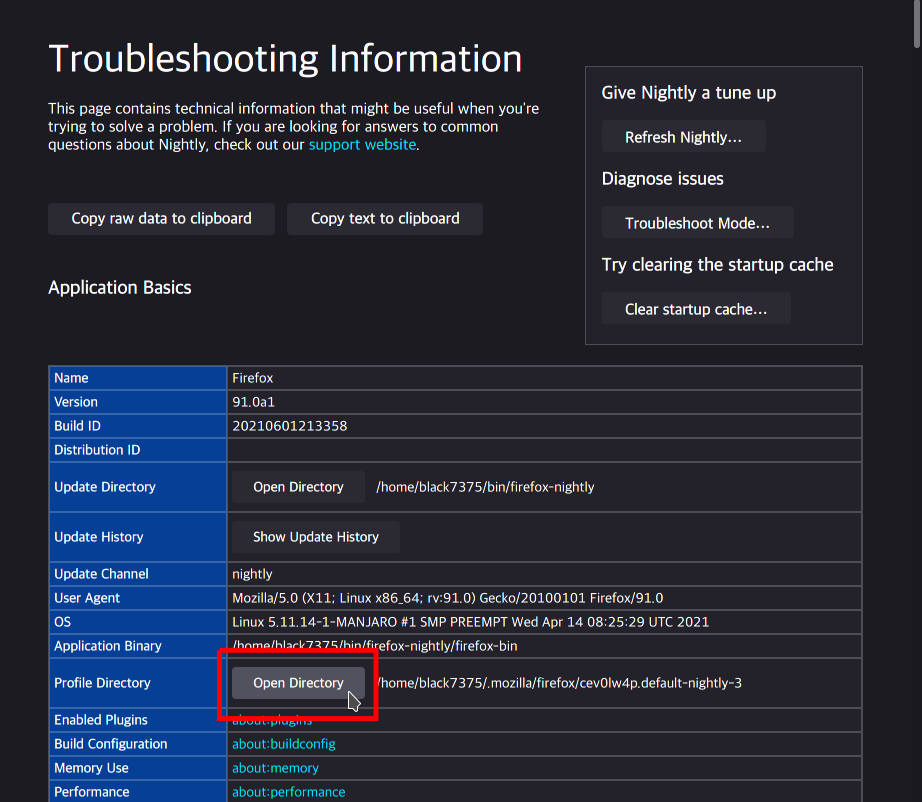
3. Edit user.js
Open the user.js file and edit it.
It must be located in the profile directory, not the chrome directory.
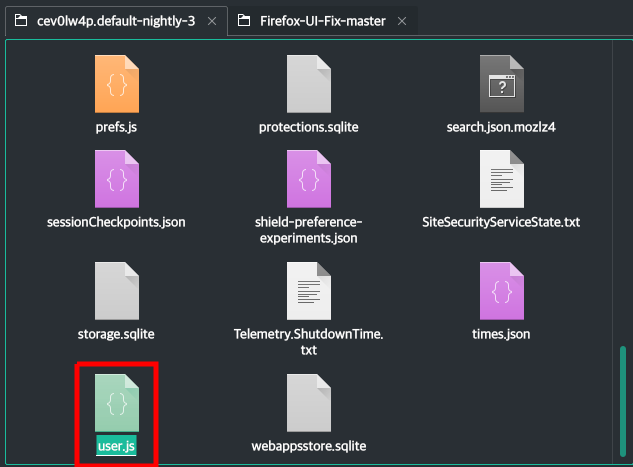
In this case, let's replace to the setting of another distribution.

Original (Click)
user_pref("userChrome.tab.connect_to_window",          true); // Original, Photon
user_pref("userChrome.tab.color_like_toolbar",         true); // Original, Photon

user_pref("userChrome.tab.lepton_like_padding",        true); // Original
user_pref("userChrome.tab.photon_like_padding",       false); // Photon

user_pref("userChrome.tab.dynamic_separator",          true); // Original, Proton
user_pref("userChrome.tab.static_separator",          false); // Photon
user_pref("userChrome.tab.static_separator.selected_accent", false); // Just option

user_pref("userChrome.tab.newtab_button_like_tab",     true); // Original
user_pref("userChrome.tab.newtab_button_smaller",     false); // Photon
user_pref("userChrome.tab.newtab_button_proton",      false); // Proton

user_pref("userChrome.icon.panel_full",                true); // Original, Proton
user_pref("userChrome.icon.panel_photon",             false); // Photon
user_pref("userChrome.icon.panel_sparse",             false); // Just option

// Original Only
user_pref("userChrome.tab.box_shadow",                 true);
user_pref("userChrome.tab.bottom_rounded_corner",      true);

// Photon Only
user_pref("userChrome.tab.photon_like_contextline",   false);
user_pref("userChrome.rounding.square_tab",           false);
Photon Style (Click)
user_pref("userChrome.tab.connect_to_window",          true); // Original, Photon
user_pref("userChrome.tab.color_like_toolbar",         true); // Original, Photon

user_pref("userChrome.tab.lepton_like_padding",       false); // Original
user_pref("userChrome.tab.photon_like_padding",        true); // Photon

user_pref("userChrome.tab.dynamic_separator",         false); // Original, Proton
user_pref("userChrome.tab.static_separator",           true); // Photon
user_pref("userChrome.tab.static_separator.selected_accent", false); // Just option

user_pref("userChrome.tab.newtab_button_like_tab",    false); // Original
user_pref("userChrome.tab.newtab_button_smaller",      true); // Photon
user_pref("userChrome.tab.newtab_button_proton",      false); // Proton

user_pref("userChrome.icon.panel_full",               false); // Original, Proton
user_pref("userChrome.icon.panel_photon",              true); // Photon
user_pref("userChrome.icon.panel_sparse",             false); // Just option

// Original Only
user_pref("userChrome.tab.box_shadow",                false);
user_pref("userChrome.tab.bottom_rounded_corner",     false);

// Photon Only
user_pref("userChrome.tab.photon_like_contextline",    true);
user_pref("userChrome.rounding.square_tab",            true);
Proton Style (Click)
user_pref("userChrome.tab.connect_to_window",         false); // Original, Photon
user_pref("userChrome.tab.color_like_toolbar",        false); // Original, Photon

user_pref("userChrome.tab.lepton_like_padding",       false); // Original
user_pref("userChrome.tab.photon_like_padding",       false); // Photon

user_pref("userChrome.tab.dynamic_separator",          true); // Original, Proton
user_pref("userChrome.tab.static_separator",          false); // Photon
user_pref("userChrome.tab.static_separator.selected_accent", false); // Just option

user_pref("userChrome.tab.newtab_button_like_tab",    false); // Original
user_pref("userChrome.tab.newtab_button_smaller",     false); // Photon
user_pref("userChrome.tab.newtab_button_proton",       true); // Proton

user_pref("userChrome.icon.panel_full",                true); // Original, Proton
user_pref("userChrome.icon.panel_photon",             false); // Photon
user_pref("userChrome.icon.panel_sparse",             false); // Just option

// Original Only
user_pref("userChrome.tab.box_shadow",                false);
user_pref("userChrome.tab.bottom_rounded_corner",     false);

// Photon Only
user_pref("userChrome.tab.photon_like_contextline",   false);
user_pref("userChrome.rounding.square_tab",           false);
4. Restart
Click the Clear startup cache... at the top of about:support

Now, you can see other distribution theme.
Try to restart after changing your Default Settings section.
5. Precautions
- Restart is required to apply after changing the settings
- Always use only
trueorfalse- Values such as
0,1,null,"true","false"etc. do not work. - Settings that already have
truewill continue to apply even if they are commented with//or/* */ - Explicitly change the setting to
falsevalue if you want to disable it
- Values such as
Set using about:config
Targets
- Custom Settings
1. Go to about:config
Then click Accept the Risk and Continue.

2. Create custom setting
We will try tabs on bottom.
Create userChrome.tabbar.on_bottom setting as Boolean type.


3. Restart
Click the Clear startup cache... at the top of about:support
Now, you can see tabs on bottom.

4. Precautions
- Distribution Settings and Default Settings are initialized even if they are set.
- Use the way of edit
user.js
- Use the way of edit
- Sub -settings like
userChrome.tabbar.on_bottom.above_bookmarkdo not apply whenuserChrome.tabbar.on_bottomisfalse.