
14 KiB
Libraries
To see the full list of dependencies, see the ciel.asd project definition or this dependencies list.
Data structures
Generic and nested access to datastructures (access)
From Access, we import access and accesses (plural).
It's always
(access my-structure :elt)
for an alist, a hash-table, a struct, an object… Use accesses for nested access (specially useful with JSON).
Hash-table utilities (Serapeum)
We import functions from Serapeum. https://github.com/ruricolist/serapeum/blob/master/REFERENCE.md#hash-tables
To see their full list with their documentation, see serapeum.
:dict
:do-hash-table ;; see also trivial-do
:dict*
:dictq  ;; quoted
:href  ;; for nested lookup.
:href-default
:pophash
:swaphash
:hash-fold
:maphash-return
:merge-tables
:flip-hash-table
:set-hash-table
:hash-table-set
:hash-table-predicate
:hash-table-function
:make-hash-table-function
:delete-from-hash-table
:pairhash
Here's how we can create a hash-table with keys and values:
;; create a hash-table:
(dict :a 1 :b 2 :c 3)
;; =>
(dict
 :A 1
 :B 2
 :C 3
)
In default Common Lisp, you would do:
  (let ((ht (make-hash-table :test 'equal)))
    (setf (gethash :a ht) 1)
    (setf (gethash :b ht) 2)
    (setf (gethash :c ht) 3)
    ht)
;; #<HASH-TABLE :TEST EQUAL :COUNT 3 {1006CE5613}>
As seen above, hash-tables are pretty-printed by default.
You can toggle the representation with toggle-pretty-print-hash-table, or by setting
(setf *pretty-print-hash-tables* nil)
in your configuration file.
Sequences utilities (Alexandria, Serapeum)
From Serapeum we import:
:assort
:batches
:runs
:partition
:partitions
:split-sequence
And from Alexandria:
:iota
:flatten
:shuffle
:random-elt
:length=
:last-elt
:emptyp
and some more.
String manipulation (str)
Available with the str prefix.
https://github.com/vindarel/cl-str/
Data formats
CSV
You have cl-csv, under its cl-csv package name and the csv local nickname.
;; read a file into a list of lists
(cl-csv:read-csv #P"file.csv")
=> (("1" "2" "3") ("4" "5" "6"))

;; read csv from a string (streams also supported)
(cl-csv:read-csv "1,2,3
4,5,6")
=> (("1" "2" "3") ("4" "5" "6"))

;; read a file that's tab delimited
(cl-csv:read-csv #P"file.tab" :separator #\Tab)

;; loop over a CSV for effect
(let ((sum 0))
  (cl-csv:do-csv (row #P"file.csv")
    (incf sum (parse-integer (nth 0 row))))
  sum)
See also:
- auto-text, automatic detection for text files (encoding, end of line, column width, csv delimiter etc). inquisitor for detection of asian and far eastern languages.
- CLAWK, an AWK implementation embedded into Common Lisp, to parse files line-by-line.
JSON
We use cl-json (GitHub). It has a json nickname.
To encode an object to a string, use encode-json-to-string:
(json:encode-json-to-string (list (dict :a 1)))
;; "[{\"A\":1}]"
To decode from a string: decode-json-from-string.
To encode or decode objects from a stream, use:
encode-json object &optional streamdecode-json &optional stream
as in:
(with-output-to-string (s)
   (json:encode-json (dict :foo (list 1 2 3)) s))
;; "{\"FOO\":[1,2,3]}"

(with-input-from-string (s "{\"foo\": [1, 2, 3], \"bar\": true, \"baz\": \"!\"}")
  (json:decode-json s))
;; ((:|foo| 1 2 3) (:|bar| . T) (:|baz| . "!"))
cl-json can encode and decode from objects. Given a simple class:
(defclass person ()
  ((name :initarg :name)
   (lisper :initform t)))
We can encode an instance of it:
(json:encode-json-to-string (make-instance 'person :name "you"))
;; "{\"NAME\":\"you\",\"LISPER\":true}"
By default, cl-json wants to convert our lisp symbols to camelCase, and the JSON ones to lisp-case. We disable that in the ciel-user package.
You can set this behaviour back with:
(setf json:*json-identifier-name-to-lisp* #'json:camel-case-to-lisp)
(setf json:*lisp-identifier-name-to-json* #'json:lisp-to-camel-case)
Date and time
The local-time package is available.
See also awesome-cl#date-and-time and the Cookbook.
Databases
Mito and SxQL are available.
https://lispcookbook.github.io/cl-cookbook/databases.html
GUI (ltk)
We ship ltk.
The Tk toolkit is nearly ubiquitous and simple to use. It doesn't have a great deal of widgets, but it helps anyways for utility GUIs. Moreover, it doesn't look aweful (as it did back), it has themes to look nearly native on the different platforms.
Here's how it looks like on Mac:
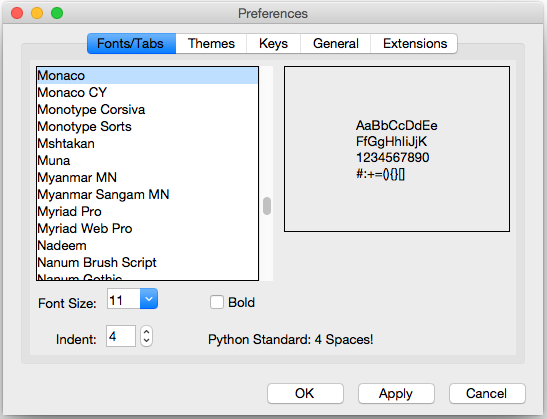
You have other GUI options a quickload away (Qt4, Gtk, IUP, Nuklear, not mentioning LispWorks CAPI…): https://lispcookbook.github.io/cl-cookbook/gui.html
Here's how to start with Ltk:
- either put yourself in the
ltk-userpackage:
(in-package :ltk-user)
- either
useltk:
(use-package :ltk)
Use the with-ltk macro to define your GUI, use make-instance + a widget name to create it, and use the grid to position widgets.
(with-ltk ()
  (let ((button (make-instance 'button :text "hello")))
    (grid button 0 0)))
Read more: https://lispcookbook.github.io/cl-cookbook/gui.html#tk
Iteration
We ship iterate and for so you can try them, but we don't import their symbols.
See https://lispcookbook.github.io/cl-cookbook/iteration.html for examples, including about the good old loop.
We import macros from trivial-do, that provides dolist-like macro to iterate over more structures:
dohash: dohash iterates over the elements of an hash table and binds key-var to the key,
value-var to the associated value and then evaluates body as a tagbody that can include declarations. Finally the result-form is returned after the iteration completes.
doplist: doplist iterates over the elements of an plist and binds key-var to the key, value-var to
the associated value and then evaluates body as a tagbody that can include declarations. Finally the result-form is returned after the iteration completes.
doalist: doalist iterates over the elements of an alist and binds key-var to the car of each element,
value-var to the cdr of each element and then evaluates body as a tagbody that can include declarations. Finally the result-form is returned after the iteration completes.
doseq*: doseq* iterates over the elements of an sequence and binds position-var to the index of each
element, value-var to each element and then evaluates body as a tagbody that can include declarations. Finally the result-form is returned after the iteration completes.
doseq: doseq iterates over the elements of an sequence and binds value-var to successive values
and then evaluates body as a tagbody that can include declarations. Finally the result-form is returned after the iteration completes.
dolist*: dolist* iterates over the elements of an list and binds position-var to the index of each
element, value-var to each element and then evaluates body as a tagbody that can include declarations. Finally the result-form is returned after the iteration completes.
Numerical and scientific
We import mean, variance, median and clamp from Alexandria.
We import functions to parse numbers (Common Lisp only has parse-integer by default).
Similar to PARSE-INTEGER, but parses a floating point value and returns the value as the specified TYPE (by default *READ-DEFAULT-FLOAT-FORMAT*). The DECIMAL-CHARACTER (by default #.) specifies the separator between the integer and decimal parts, and the EXPONENT-CHARACTER (by default #e, case insensitive) specifies the character before the exponent. Note that the exponent is only parsed if RADIX is 10.
ARGLIST: (string &key (start 0) (end (length string)) (radix 10) (junk-allowed nil)
        (decimal-character .) (exponent-character e)
        (type *read-default-float-format*))
From parse-number, we import:
:parse-number
:parse-positive-real-number
:parse-real-number
PARSE-NUMBER
  FUNCTION: Given a string, and start, end, and radix parameters,
  produce a number according to the syntax definitions in the Common
  Lisp Hyperspec.
  ARGLIST: (string &key (start 0) (end nil) (radix 10)
          ((float-format *read-default-float-format*)
           *read-default-float-format*))
See also cl-decimals to parse and format decimal numbers.
We don't ship Numcl, a Numpy clone in Common Lisp, but we invite you to install it right now with Quicklisp:
(ql:quickload "numcl")
Plotting
We import the vgplot plotting library, an interface to gnuplot.
It has a very good demo: just call
(vgplot:demo)

Here's a simple example to create a new plot:
 (vgplot:plot #(1 2 3) #(0 -2 -17) "silly example")
 (vgplot:title "Simple curve")
 (vgplot:text 1.2 -14 "Plot vectors with legend and add a title")
This will open a gnuplot window, which you can interfere with by entering more vgplot commands.
format-plot allows direct commands to the running gnuplot process:
(vgplot:format-plot t "set size square 0.5,0.5~%")
(vgplot:replot)
You can open other plots in parallel with new-plot, and create subplots in the same window with subplot.
You can graph data from files:
(vgplot:plot (first (vgplot:load-data-file "data.csv")))
Close plots with close-plot or close-all-plots.
Explore the demo here.
Regular expressions
Use ppcre.
See https://common-lisp-libraries.readthedocs.io/cl-ppcre and https://lispcookbook.github.io/cl-cookbook/regexp.html
Threads, monitoring, scheduling
We ship:
Bordeaux-Threads (bt prefix)
Moira (monitor and restart background threads)
Trivial Monitored Thread offers a very simple (aka trivial) way of spawning threads and being informed when one any of them crash and die.
cl-cron (see the sources on our fork here)
For example, run a function every minute:
(defun say-hi ()
  (print "Hi!"))
(cl-cron:make-cron-job #'say-hi)
(cl-cron:start-cron)
Wait a minute to see some output.
Stop all jobs with stop-cron.
make-cron's keyword arguments are:
(minute :every) (step-min 1) (hour :every) (step-hour 1) (day-of-month :every)
(step-dom 1) (month :every) (step-month 1) (day-of-week :every)
(step-dow 1)
(boot-only nil) (hash-key nil))
HTTP and URI handling
See:
- Dexador. Use the
dexnickname or thehttplocal nickname. - Quri
- Lquery
(dex:get "http://my.url")
Web
We ship:
- Hunchentoot
- Easy-routes
https://lispcookbook.github.io/cl-cookbook/web.html
Development
Testing (Fiveam)
The FiveAM test framework is available for use.
Below we create a package to contain our tests and we define the most simple one:
(defpackage ciel-5am
  (:use :cl :5am))

(in-package :ciel-5am)

(test test-one
  (is (= 1 1)))
Run the test with:
(run! 'test-one)

Running test TEST-ONE .
 Did 1 check.
    Pass: 1 (100%)
    Skip: 0 ( 0%)
    Fail: 0 ( 0%)

T
NIL
NIL
If the test fails you will see explanations:
> (run! 'test-one)

Running test TEST-ONE .f
 Did 2 checks.
    Pass: 1 (50%)
    Skip: 0 ( 0%)
    Fail: 1 (50%)

 Failure Details:
 --------------------------------
 TEST-ONE []:

1

 evaluated to

1

 which is not

=

 to

2


 --------------------------------

NIL
(#<IT.BESE.FIVEAM::TEST-FAILURE {1007307ED3}>)
NIL
Use run to not print explanations.
You can use (!) to re-run the last run test.
You can ask 5am to open the interactive debugger on an error:
(setf *debug-on-error* t)
Logging (log4cl)
https://github.com/sharplispers/log4cl/
(log:info …)
Discoverability of documentation (repl-utilities' readme, summary,…)
We use readme and summary from repl-utilities.
Learn more with:
(readme repl-utilities)
printv
 (:printv
  (defvar *y*)
  (defparameter *x* 2)
  (setf *y* (sqrt *x*))
  (setf *y* (/ 1 *y*)))

;; This produces the following text to PRINTV's output stream, and still results in the same returned value: 0.70710677.

;;;   (DEFVAR *Y*) => *Y*
;;;   (DEFPARAMETER *X* 2) => *X*
;;;   (SETF *Y* (SQRT *X*)) => 1.4142135
;;;   (SETF *Y* (/ 1 *Y*)) => 0.70710677
Getting a function's arguments list (trivial-arguments)
https://github.com/Shinmera/trivial-arguments
(defun foo (a b c &optional d) nil)
(arglist #'foo)
;; (a b c &optional d)