太记

可定制性极强的个人知识管理系统,使用 Git 作为备份管理器和博客平台

[![License: MPL 2.0](https://img.shields.io/badge/License-MPL%202.0-brightgreen.svg)](LICENSE) [![GitHub Actions Build Status](https://github.com/tiddly-gittly/TidGi-Desktop/actions/workflows/release.yml/badge.svg)](https://github.com/tiddly-gittly/TidGi-Desktop/actions) [![Lin Onetwo!](https://img.shields.io/github/followers/linonetwo)](https://github.com/linonetwo)


| [最新版下载按钮](https://github.com/tiddly-gittly/TidGi-Desktop/releases/latest) | | :--------------------------------------------------------------------------------------------------------------------------------------------------------------------------------------------------------------------------: | | [![GitHub Releases](https://img.shields.io/github/downloads/tiddly-gittly/TidGi-Desktop/latest/total?label=Download%20Latest%20Release&style=for-the-badge)](https://github.com/tiddly-gittly/TidGi-Desktop/releases/latest) | ## 产品截图及试用 ### 试用 - [在线网页版博客 Demo](https://tiddly-gittly.github.io/Tiddlywiki-NodeJS-Github-Template/) - [太微官网](https://tiddlywiki.com/) ### 截图 ![Screenshot of main-window](../images/main-window-hide-bar.png)

| 加载 NodeJS 版维基 | | :-----------------------------------------------------: | | ![Screenshot of main-window](../images/main-window.png) | | 新建本地维基 | 下载云端维基 | | :---------------------------------------------------------: | :-------------------------------------------------------------: | | ![Screenshot of add-workspace](../images/add-workspace.png) | ![Screenshot of clone-workspace](../images/clone-workspace.png) | | 多语言翻译和设置界面 | | :--------------------------------------------------------------------------------------------------------------------------------------------------: | | ![Screenshot of preference](../images/preference.png) | | 交互式代码执行 | | ![Screen recording of zx-script in tiddlywiki](https://user-images.githubusercontent.com/3746270/133831500-ae91164c-7948-4de4-9a81-7017ed3b65c9.gif) | | 社区插件源 | | ![Screenshot of add-workspace](../images/community-plugin-library.png) |
Mac 使用者点击这里展开操作方法,我费劲办法也申请不到苹果开发者账号,所以你得手动信任这个应用 ◀ 首先你得把应用拖入「应用程序」文件夹才能使用!不然会弹一个报错框。 点击「取消」 ↓ ![step00001](https://user-images.githubusercontent.com/3746270/87882506-eb1ddd80-ca32-11ea-942f-1f530767db02.png) ![step00002](https://user-images.githubusercontent.com/3746270/87882509-ece7a100-ca32-11ea-8d29-a4977201090d.png) ![step00003](https://user-images.githubusercontent.com/3746270/87882510-ed803780-ca32-11ea-8996-0f3c7060131a.png) 点击「打开」 ↓ ![step00004](https://user-images.githubusercontent.com/3746270/87882512-ee18ce00-ca32-11ea-8225-045ffc0a8b86.png) 点击「允许」 ↓ ![step00005](https://user-images.githubusercontent.com/3746270/87882514-eeb16480-ca32-11ea-9afd-cae6f2bea2db.png)
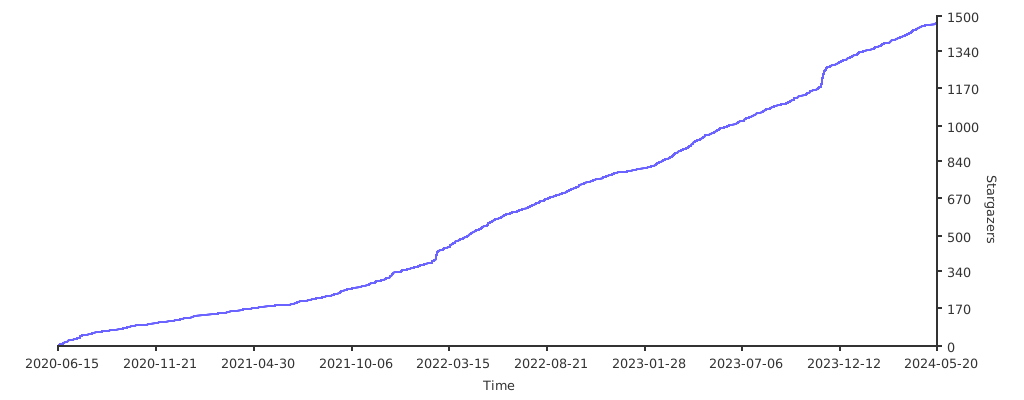
## 相关介绍 [用 TiddlyWiki 替代 Notion 和 EverNote 作为个人知识管理系统(Chinese)](https://zhuanlan.zhihu.com/p/140473235) [墨屉-先进的间隔重复和渐进阅读解决方案](https://live.bilibili.com/23806126) ## 关于「太记-桌面版」 「太记」是一个跨平台的笔记软件、时间和任务管理工具、碎片化知识管理工具,此乃其桌面版。「太记」基于强大的 [NodeJS 版「太微(TiddlyWiki)」](https://github.com/Jermolene/TiddlyWiki5#installing-tiddlywiki-on-nodejs) 构建,并带上了大量来自[太微社区(TiddlyWiki community)](https://groups.google.com/forum/#!forum/tiddlywiki)的插件。 「太记」来自 TiddlyWiki 的译名「太微」,以及曾用名 TiddlyGit 首字母的谐音(后来我们又根据中文谐音把英文名改成了 TidGi)。当然你也可以直接叫它 [TGNote](https://github.com/tiddly-gittly/TGNote),镰锤 ☭ 笔记。 为什么把 TiddlyWiki 翻译成「太微」?因为受到 @pimgeek 的启发:TiddlyWiki 可以干很多细致轻量的工作,但也从不限制用法,可以无限组合叠加。故以其首字母音译为「太微」,TiddlyWiki 可以称为「太微笔记」「太微万能抽屉」「太微卡片盒」…… > 太微垣,三垣之一,按《步天歌》,太微垣為三垣的上垣。 > 太微垣又名天庭,是政府的意思,也是貴族及大臣們居住的地方。 ## 下载 Packaging status > Win 和 Mac 的普通用户直接下载 App | [最新版下载按钮](https://github.com/tiddly-gittly/TidGi-Desktop/releases/latest) | | :--------------------------------------------------------------------------------------------------------------------------------------------------------------------------------------------------------------------------: | | [![GitHub Releases](https://img.shields.io/github/downloads/tiddly-gittly/TidGi-Desktop/latest/total?label=Download%20Latest%20Release&style=for-the-badge)](https://github.com/tiddly-gittly/TidGi-Desktop/releases/latest) | > For arch user ```bash yay tidgi ``` > Mac 命令行用户 ```bash brew install TidGi # Not tested ``` ## 移动端应用 See [Tiddloid](https://github.com/donmor/Tiddloid) for Android App developed by donmor. ## 数据隐私保护 你可以选择你的 WIKI 工作区的存储服务提供商: 1. 「Github」是一个无限存储空间、可以用 GH-Pages 部署博客的平台。 1. 「本地」模式会创建一个本地仓库来备份你的 WIKI,你可以用 [GithubDesktop](https://github.com/desktop/desktop) 来手动同步内容到云端。 1. 「Gitlab」和「码云」还待支持,不过架子已经搭好了。 ## 与竞品的差异 ### 与 [TiddlyDesktop](https://github.com/Jermolene/TiddlyDesktop) 的差别? 1. 太微的 NodeJS 版本有无缝的自动保存体验,这是利用 SyncAdaptor 技术(而不是 Saver )带来的的优势,太记对 NodeJS wiki 有更好的支持,而 TD 主要支持 HTML 版单文件 WIKI,各有优势。 1. 使用 NodeJS wiki 时,我们可以有分离的 tiddler 文件,这些文件可以手工修改,也可以由其他程序修改(例如装了 [VSCode-TW5-Syntax](https://github.com/joshuafontany/VSCode-TW5-Syntax) 的 VSCode),而且方便细粒度备份回滚 1. 尽管 TiddlyDesktop 也可以加载由 nodejs 版太微生成的 wiki 文件夹,但太记还可以轻松地将该文件夹自动备份到 Github 上。 1. 通过使用 Electron 技术,我们可以在太微中使用 `fs` 、 `git` 和许多其他 nodejs 的扩展接口,这大大扩展了插件可使用的能力。这种可扩展性也是我选择太微作为我日常知识管理工具的原因,太记进一步强化了它。 ## 为什么使用 Github 存储 因为 Github 是最好的免费民用级[存储即服务(BaaS)](https://www.alibabacloud.com/blog/backend-as-a-service-baas-for-efficient-software-development_519851)之一。 1. 它的存储基本上是免费的,允许我们存储无限的图像和 PDF 文件,这些文件可以有永久的 URI 供公众下载。 1. 它有 GraphQL API,允许我们以程序化的方式更新我们的 wiki。 1. 它有免费的[CI](https://github.com/features/actions)来自动部署我们的太微博客。 1. 它提供了无限数量的代码仓库,分为公共的和私有的,这使我们能够将私有内容存储到我们的太微中仅在本地查看,然后只把公开部分部署成博客。 ## 参与开发 阅读[开发指引文档(英文)](../Development.md) ## 鸣谢 The desktop app shell is based on [https://github.com/atomery/singlebox](atomery/singlebox) and [atomery/webcatalog](https://github.com/atomery/webcatalog), they provide lots of utils around website-generated-app, much powerful than generating app from website simply using Chrome. Also the independent developer @quanglam2807 behind these great tools helps me a lot when I develop TidGi. Current Icon is download from [iconsdb](https://www.iconsdb.com/custom-color/github-11-icon.html) under Creative Commons Attribution-NoDerivs 3.0 , if you are a designer, please feel free to contribute your ICON if you have a better idea. ### 点个星星 ⭐️ 吧 Please give a star if you like it! [![Stargazers over time](https://starchart.cc/tiddly-gittly/TidGi-Desktop.svg)](https://starchart.cc/tiddly-gittly/TidGi-Desktop)